当前位置:首页>PPT制作>利用DeepSeek大模型编程--PPT制作智能体开发

利用DeepSeek大模型编程--PPT制作智能体开发

  • 2026-03-22 02:00:06
利用DeepSeek大模型编程--PPT制作智能体开发
1、前言
想必大家目前工作当中经常要汇报工作进度、开发进度、计划及总结,那就离不开PPT的制作,网上有很多PPT制作的途径,比如kimi(逐步收费)、百度PPT(收费)、AiPPT(收费)、WPS AI‌(收费),当然大家可以付费使用,基于此,我们想自己动手做一个PPT生成的工具(PPT智能体),借助deepseek编程助手完成这项任务
2、提出需求,输出任务
本次任务通过整理PPT的大纲内容,交给PPT智能体,让他可以自动完成PPT任务,这里需要借助deepseek大模型进行增强功能,所以咱们需要去deepseek平台申请API密匙,大家可以充钱即可,充钱金额视自己使用情况(密匙的格式:sk-xxxxx)
3、整理deepseek开发提示词,完成代码生成
大家在做提示词需要包含4个部分,提示词=角色+任务+背景+格式,这样大模型会更加清楚及理解你需要的完成任务,加快中文理解及代码生成
(1)第一次提示词:
帮我生成一个ppt智能体,只需要给你ppt的正文内容稿件,你就可以快速生成,大模型用deepseek,请你提供完整python代码
以下是大模型思考过程(我已经忽略第一次提示词、这次是希望他用deepseek来增强PPT生成)
我们被要求提供完整的Python代码,将大模型修改为deepseek。之前提供的代码使用的是openai库,现在需要改为调用deepseek API。deepseek API兼容OpenAI格式,但需要修改base_url和api_key。用户要求“请你提供完整python代码”,意味着需要给出一个可以直接运行的Python脚本,使用deepseek模型进行AI解析。需要明确:需要安装的库可能包括:gradio, python-pptx, openai(因为deepseek兼容openai库,或者可以使用requests直接调用,但用openai库更方便)。API密钥设置:可以从环境变量读取DEEPSEEK_API_KEY,或者让用户在界面输入?但题目没有指定,我们可以沿用环境变量的方式,但修改变量名为DEEPSEEK_API_KEY需要修改base_url为deepseek的API地址:https://api.deepseek.com/v1模型名称使用deepseek-chat或deepseek-coder等,一般用deepseek-chat。我们将在原有代码基础上修改:在ai_parse函数中,使用openai库,但设置openai.api_base = "https://api.deepseek.com/v1",并且api_key从环境变量DEEPSEEK_API_KEY获取。修改model为"deepseek-chat"可能需要添加额外的参数,如温度等。注意异常处理。此外,需要更新界面中的提示文字,将OPENAI_API_KEY改为DEEPSEEK_API_KEY,将AI增强的描述改为使用DeepSeek模型。我们需要输出完整的Python代码,用户可以直接复制运行。我们将在回答中提供完整代码,并以代码块展示。同时,考虑到之前给出的HTML页面中包含了代码展示和说明,但用户这次只要求提供完整python代码,所以我们可以直接给出Python脚本,无需包含HTML。不过为了符合上下文,我们可能仍然需要在回答中嵌入代码。用户说“请你提供完整python代码”,所以应该只给Python代码,不要HTML我们将输出一个完整的Python脚本,开头有注释说明依赖和用法。另外,注意原代码中使用了openai库,需要提醒用户安装openai和python-pptx、gradio。我们会保留。我们将修改如下:环境变量名改为DEEPSEEK_API_KEY设置openai.api_basemodel使用"deepseek-chat"调整错误提示。同时,我们还可以考虑让用户在界面输入API密钥,但为了简洁,我们沿用环境变量方式,并在界面提示
这里需要,安装依赖、设置环境变量 DEEPSEEK_API_KEY,运行后即可通过本地网页打开使用,代码如下:一键复制到开发环境运行
# ppt_agent_deepseek.py# PPT智能体,使用DeepSeek模型进行AI增强解析# 安装依赖: pip install gradio python-pptx openaiimport osimport reimport jsonimport tempfileimport uuidfrom typing import ListDictOptionalimport gradio as grimport openaifrom pptx import Presentation# ===================== 核心解析 =====================def fallback_parse(text: str) -> List[Dict]:    """    基础解析:用 '---' 分割幻灯片,第一行为标题,其余为要点    """    slides = []    raw_slides = text.split("---")    for raw in raw_slides:        lines = [line.strip() for line in raw.splitlines() if line.strip() != '']        if not lines:            continue        title = lines[0]        content = lines[1:] if len(lines) > 1 else []        slides.append({"title": title, "content": content, "notes"""})    return slidesdef ai_parse(text: str, api_key: str) -> Optional[List[Dict]]:    """    使用DeepSeek将文本转为结构化幻灯片 (需要有效DEEPSEEK_API_KEY)    """    # 配置DeepSeek API (兼容OpenAI SDK)    openai.api_key = api_key    openai.api_base = "https://api.deepseek.com/v1"    system_prompt = (        "你是一位PPT结构专家。将用户输入的文稿转换成幻灯片JSON格式。"        "输出严格的JSON对象,包含slides列表,每个slide有title(string), "        "content(字符串列表,每个元素是一个要点或段落), notes(string, 可选)。"        "不要包含任何额外解释或Markdown。"    )    try:        response = openai.ChatCompletion.create(            model="deepseek-chat",  # 使用DeepSeek模型            messages=[                {"role""system""content": system_prompt},                {"role""user""content": text}            ],            temperature=0.3,            max_tokens=1800,            request_timeout=30        )        content = response.choices[0].message.content        # 提取第一个完整的JSON对象(防止模型输出额外文字)        json_match = re.search(r'\{.*\}', content, re.DOTALL)        if not json_match:            return None        data = json.loads(json_match.group())        slides = data.get("slides", [])        # 简单校验        if isinstance(slides, listand len(slides) > 0:            return slides        return None    except Exception as e:        print(f"[AI解析异常] {e}")        return None# ===================== PPT生成 =====================def create_ppt(slides: List[Dict]) -> str:    """    根据幻灯片数据生成PPTX文件,返回临时文件路径    """    prs = Presentation()    # 使用版式1:标题+内容 (大多数模板都有)    layout = prs.slide_layouts[1]    for slide_info in slides:        title = slide_info.get("title""无标题").strip() or "无标题"        content = slide_info.get("content", [])        notes = slide_info.get("notes""")        slide = prs.slides.add_slide(layout)        # 设置标题        if slide.shapes.title:            slide.shapes.title.text = title        # 设置内容占位符(通常是索引1,但稳健起见遍历查找)        content_placeholder = None        for shape in slide.placeholders:            if shape.placeholder_format.idx == 1:  # 标准内容占位符索引                content_placeholder = shape                break        if content_placeholder is None and len(slide.placeholders) > 1:            # 如果找不到索引1,就用第二个占位符(多数情况第一个是标题)            content_placeholder = slide.placeholders[1]        if content_placeholder:            tf = content_placeholder.text_frame            tf.clear()  # 移除可能的默认文字            for point in content:                if point.strip() == "":                    continue                p = tf.add_paragraph()                p.text = point                p.level = 0  # 可进一步根据缩进识别层级,暂不实现        # 添加演讲者备注        if notes:            notes_slide = slide.notes_slide            notes_slide.notes_text_frame.text = notes    # 保存到临时文件    out_filename = os.path.join(tempfile.gettempdir(), f"ppt_agent_{uuid.uuid4().hex}.pptx")    prs.save(out_filename)    return out_filename# ===================== 整合逻辑 =====================def generate_ppt(text: str, use_ai: bool) -> tuple:    """    主函数:解析+生成,返回 (PPT文件路径, 状态信息)    """    if not text or not text.strip():        raise gr.Error("请输入稿件内容")    slides = None    method = "基础解析"    ai_used = False    if use_ai:        api_key = os.getenv("DEEPSEEK_API_KEY")  # 从环境变量获取DeepSeek密钥        if api_key:            slides = ai_parse(text, api_key)            if slides:                method = "DeepSeek增强解析"                ai_used = True            else:                method = "DeepSeek解析失败,已回退到基础解析"        else:            method = "未检测到DEEPSEEK_API_KEY,使用基础解析"    if not ai_used or slides is None:        slides = fallback_parse(text)        if not slides:            raise gr.Error("未能解析出任何幻灯片,请检查格式 (用---分隔页面)")    ppt_path = create_ppt(slides)    info = f"✅ 生成成功 | 方式: {method} | 页数: {len(slides)}"    return ppt_path, info# ===================== Gradio 界面 =====================with gr.Blocks(title="PPT智能体 (DeepSeek版)", theme=gr.themes.Soft(primary_hue="blue")) as demo:    gr.Markdown(        """        ## 🧠 PPT 智能体 (DeepSeek驱动)        **只需提供文稿,自动生成专业PPT**          """    )    with gr.Row():        with gr.Column(scale=4):            text_input = gr.TextArea(                label="📝 稿件内容",                placeholder="示例:\n---\n项目启动会\n- 背景与目标\n- 时间线\n- 资源需求\n---\n市场分析\n- 竞品调研\n- 用户画像\n- 机会点",                lines=14,                elem_id="input-text"            )            with gr.Row():                use_ai_check = gr.Checkbox(                    label="✨ 使用DeepSeek增强 (需设置环境变量 DEEPSEEK_API_KEY)",                    value=False,                    interactive=True                )            submit_btn = gr.Button("⚡ 生成PPT", variant="primary", size="lg")        with gr.Column(scale=3):            output_file = gr.File(                label="📥 下载PPT",                file_types=[".pptx"],                interactive=False            )            output_info = gr.Textbox(                label="📋 生成状态",                interactive=False,                lines=2            )    gr.Examples(        examples=[            ["---\n欢迎\n- 自我介绍\n- 议程概览\n---\n核心技术\n- 架构图\n- 性能指标\n---\n下一步\n- 开发计划\n- 团队分工"],            ["---\n财务汇报 Q2\n- 营收增长20%\n- 成本降低5%\n- 现金流健康\n---\n风险提示\n- 市场波动\n- 政策变化\n---\n总结\n- 保持稳健"],        ],        inputs=[text_input],        label="📋 试试这些例子"    )    submit_btn.click(        fn=generate_ppt,        inputs=[text_input, use_ai_check],        outputs=[output_file, output_info]    )# ===================== 启动服务 =====================if __name__ == "__main__":    # 如果需要自定义端口,修改 server_port    demo.launch(server_name="0.0.0.0", server_port=7860, share=False)
把代码复制到PyCharm(建议大家开发python程序就用这个开发工具,下载地址参考AI环境搭建软件集合)然后点击运行即可,这里需要安装如下库
pip install gradio python-pptx openai
我需要利用让大模型提供阿里云的安装脚本,需要给deepseek继续提问
提供下阿里云镜像安装脚本,pip install gradio python-pptx openai
输入如下,把下面脚本复制到pycharm软件,在底部窗口,切换终端,安装即可
pip install gradio python-pptx openai -i https://mirrors.aliyun.com/pypi/simple/ --trusted-host mirrors.aliyun.com
依赖文件安装完成,回到代码窗口,鼠标右键运行,python控制台会输出如下提示
* Running on local URL:  http://0.0.0.0:7860* To create a public link, set `share=True` in `launch()`.
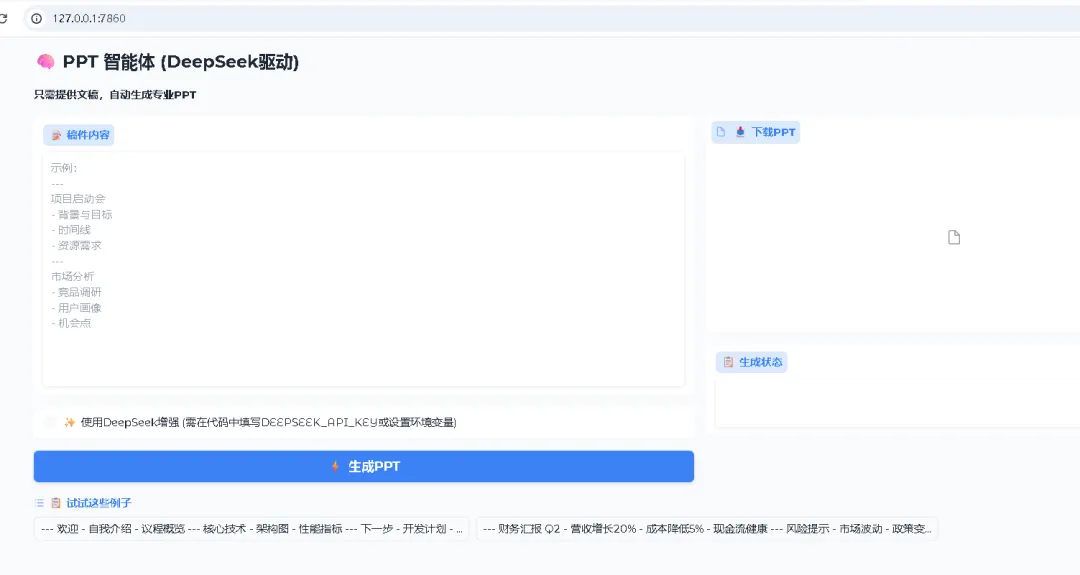
咱们在浏览器输入,即可运行,如下图示
http://127.0.0.1:7860/
这里默认的IP是本地:127.0.0.1,咱们也可以修改端口,通过如下内容设置即可,把7860修改为其他数字
# 如果需要自定义端口,修改 server_portdemo.launch(server_name="0.0.0.0", server_port=7860, share=False)
可以试一试ppt生成效果是怎么样?借助大模型我整理了一份PPT内容,交给PPT智能体,然后勾选deepseek增强,点击生成PPT按钮,看看生成情况如何?
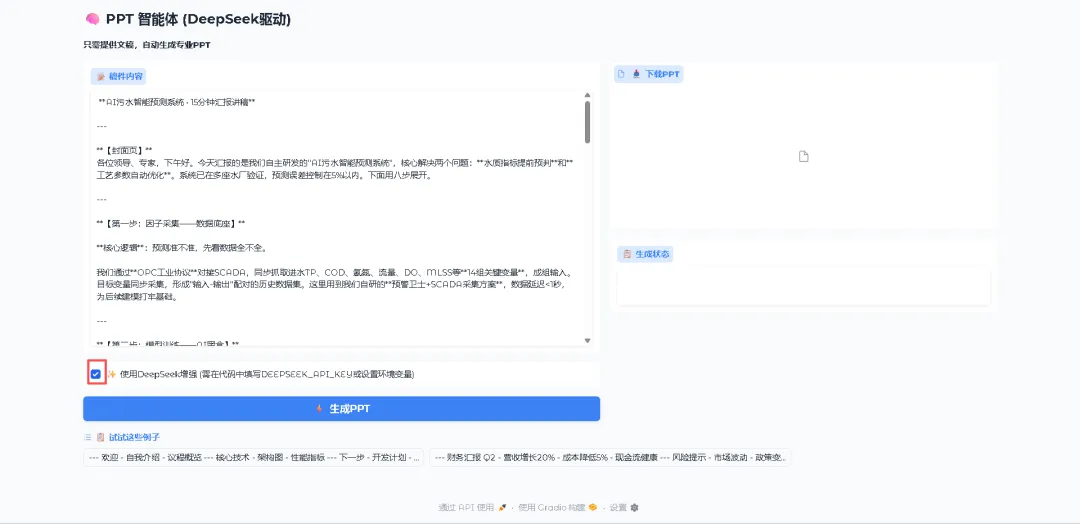
经过1分钟左右,已经生成如下:
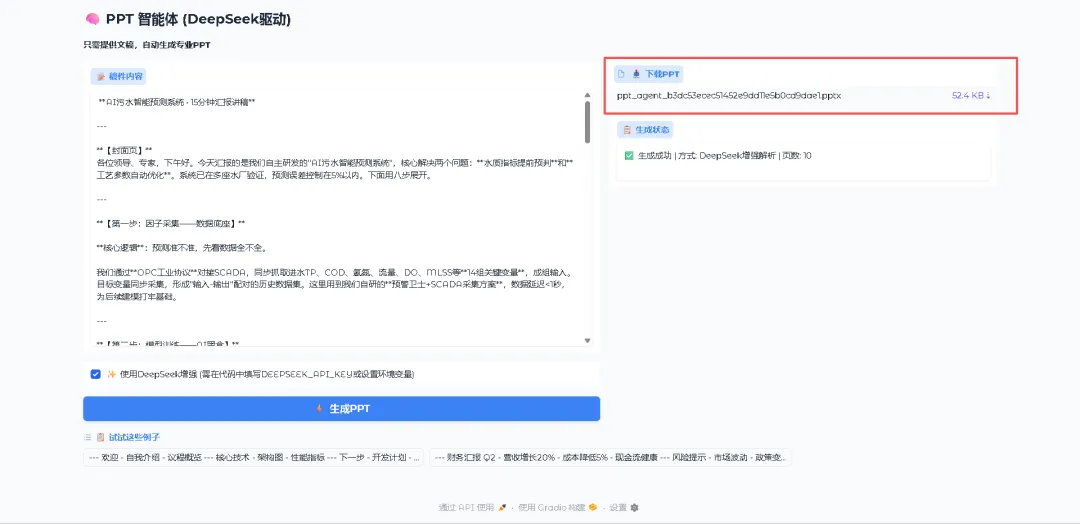
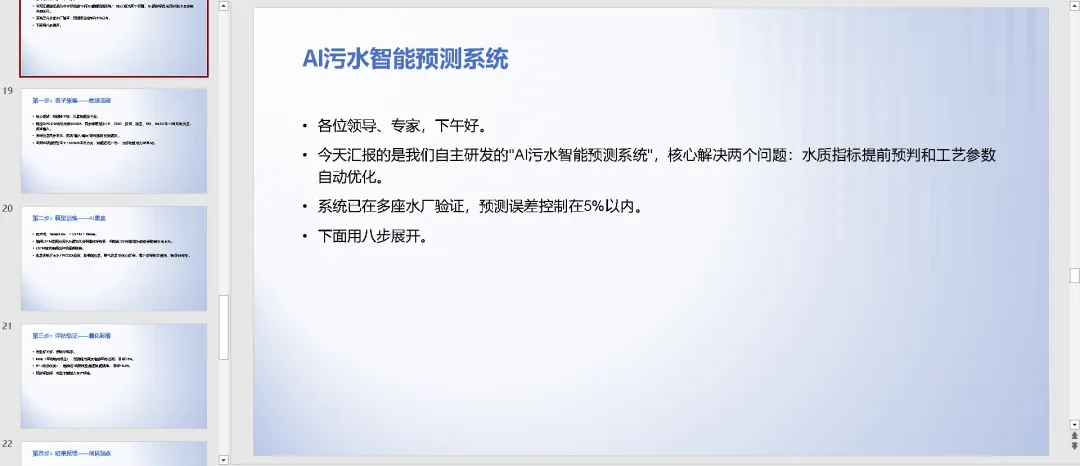
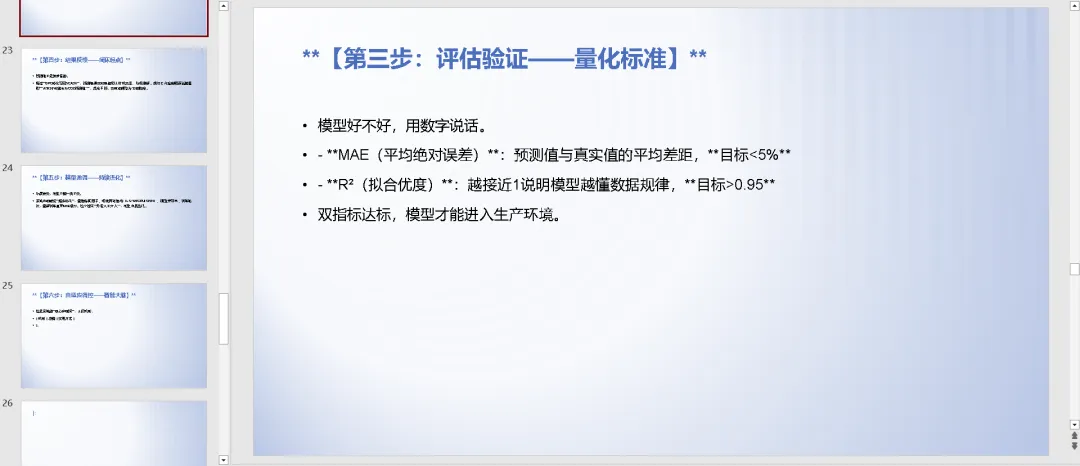
我们打开看看效果怎么样?生成效果:大概有10p,内容基本和我输入的一样,输出文字格式缺失、没有做太多修饰,基本能满足PPT的生成功能,但是ppt生成太粗糙,下面我们继续给大模型完善
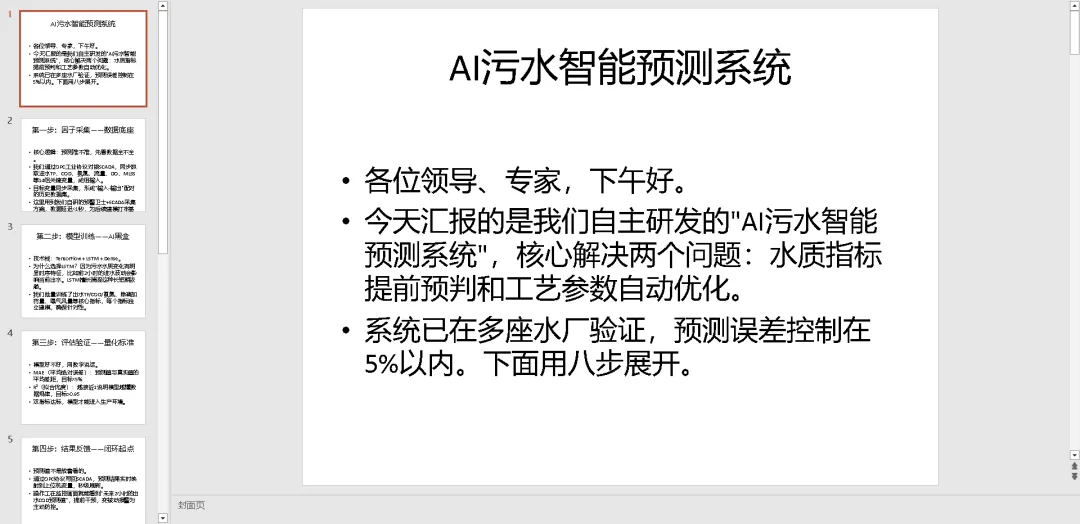
功能继续完善:之前的密匙在系统环境设置,现在要求deepseek的密匙在代码设置
(2)第二次提示词:
设置密钥:在环境变量中配置 DEEPSEEK_API_KEY(Linux/macOS: export DEEPSEEK_API_KEY=你的密钥;Windows: set DEEPSEEK_API_KEY=你的密钥)怎么设置密匙,在代码那个地方,能否修改为在代码里设置
思考过程
我们被要求修改代码,使得API密钥可以直接在代码中设置,而不是必须通过环境变量。用户希望“修改为在代码里设置”,意味着他们不想设置环境变量,而是直接在代码中写入API密钥。我们需要在代码中提供一个更直接的方式,比如在代码顶部定义一个变量,或者在界面添加一个输入框让用户输入密钥。但根据用户之前的描述:“设置密钥:在环境变量中配置...怎么设置密匙,在代码那个地方,能否修改为在代码里设置”,可能他们希望直接修改代码来填入密钥,简化部署。我们应该提供两种方式:保留环境变量,同时允许在代码中直接指定密钥(比如在文件开头设置一个变量)。或者,在界面上增加一个API密钥输入框,用户可以在网页上输入。但用户可能想要最简单的方式:只需修改代码一次,然后运行即可,不需要每次设置环境变量。因此,我们可以在代码中添加一个全局变量 DEEPSEEK_API_KEY = "你的密钥",然后优先使用这个变量,如果为空则读取环境变量。这样用户只需在代码中填入自己的密钥。同时,考虑到安全性,不建议硬编码密钥,但用户明确要求如此,我们满足需求。修改思路:在文件开头定义变量:DEEPSEEK_API_KEY = "",并注释说明可以在此填入密钥。generate_ppt函数中,检查是否设置了该变量,如果非空则使用它,否则读取环境变量。更新说明文档。我们将提供一个更新后的完整代码,包含这一修改。注意:我们需要保留原有的环境变量方式作为备选。现在提供修改后的代码。
代码如下:一键复制到开发环境运行
# ppt_agent_deepseek.py# PPT智能体,使用DeepSeek模型进行AI增强解析# 安装依赖: pip install gradio python-pptx openaiimport osimport reimport jsonimport tempfileimport uuidfrom typing import ListDictOptionalimport gradio as grimport openaifrom pptx import Presentation# ===================== 直接在下方填写你的DeepSeek API密钥 =====================# 例如:DEEPSEEK_API_KEY = "sk-xxxxxxxxxxxxxxxxxxxxxxxx"DEEPSEEK_API_KEY = ""  # 请在此处填入你的密钥,留空则从环境变量读取# ===========================================================================def fallback_parse(text: str) -> List[Dict]:    """    基础解析:用 '---' 分割幻灯片,第一行为标题,其余为要点    """    slides = []    raw_slides = text.split("---")    for raw in raw_slides:        lines = [line.strip() for line in raw.splitlines() if line.strip() != '']        if not lines:            continue        title = lines[0]        content = lines[1:] if len(lines) > 1 else []        slides.append({"title": title, "content": content, "notes"""})    return slidesdef ai_parse(text: str, api_key: str) -> Optional[List[Dict]]:    """    使用DeepSeek将文本转为结构化幻灯片    """    # 配置DeepSeek API (兼容OpenAI SDK)    openai.api_key = api_key    openai.api_base = "https://api.deepseek.com/v1"    system_prompt = (        "你是一位PPT结构专家。将用户输入的文稿转换成幻灯片JSON格式。"        "输出严格的JSON对象,包含slides列表,每个slide有title(string), "        "content(字符串列表,每个元素是一个要点或段落), notes(string, 可选)。"        "不要包含任何额外解释或Markdown。"    )    try:        response = openai.ChatCompletion.create(            model="deepseek-chat",  # 使用DeepSeek模型            messages=[                {"role""system""content": system_prompt},                {"role""user""content": text}            ],            temperature=0.3,            max_tokens=1800,            request_timeout=30        )        content = response.choices[0].message.content        # 提取第一个完整的JSON对象(防止模型输出额外文字)        json_match = re.search(r'\{.*\}', content, re.DOTALL)        if not json_match:            return None        data = json.loads(json_match.group())        slides = data.get("slides", [])        # 简单校验        if isinstance(slides, listand len(slides) > 0:            return slides        return None    except Exception as e:        print(f"[AI解析异常] {e}")        return None# ===================== PPT生成 =====================def create_ppt(slides: List[Dict]) -> str:    """    根据幻灯片数据生成PPTX文件,返回临时文件路径    """    prs = Presentation()    # 使用版式1:标题+内容 (大多数模板都有)    layout = prs.slide_layouts[1]    for slide_info in slides:        title = slide_info.get("title""无标题").strip() or "无标题"        content = slide_info.get("content", [])        notes = slide_info.get("notes""")        slide = prs.slides.add_slide(layout)        # 设置标题        if slide.shapes.title:            slide.shapes.title.text = title        # 设置内容占位符(通常是索引1,但稳健起见遍历查找)        content_placeholder = None        for shape in slide.placeholders:            if shape.placeholder_format.idx == 1:  # 标准内容占位符索引                content_placeholder = shape                break        if content_placeholder is None and len(slide.placeholders) > 1:            # 如果找不到索引1,就用第二个占位符(多数情况第一个是标题)            content_placeholder = slide.placeholders[1]        if content_placeholder:            tf = content_placeholder.text_frame            tf.clear()  # 移除可能的默认文字            for point in content:                if point.strip() == "":                    continue                p = tf.add_paragraph()                p.text = point                p.level = 0  # 可进一步根据缩进识别层级,暂不实现        # 添加演讲者备注        if notes:            notes_slide = slide.notes_slide            notes_slide.notes_text_frame.text = notes    # 保存到临时文件    out_filename = os.path.join(tempfile.gettempdir(), f"ppt_agent_{uuid.uuid4().hex}.pptx")    prs.save(out_filename)    return out_filename# ===================== 整合逻辑 =====================def generate_ppt(text: str, use_ai: bool) -> tuple:    """    主函数:解析+生成,返回 (PPT文件路径, 状态信息)    """    if not text or not text.strip():        raise gr.Error("请输入稿件内容")    slides = None    method = "基础解析"    ai_used = False    if use_ai:        # 优先使用代码中设置的密钥,其次读取环境变量        api_key = DEEPSEEK_API_KEY if DEEPSEEK_API_KEY else os.getenv("DEEPSEEK_API_KEY")        if api_key:            slides = ai_parse(text, api_key)            if slides:                method = "DeepSeek增强解析"                ai_used = True            else:                method = "DeepSeek解析失败,已回退到基础解析"        else:            method = "未设置DEEPSEEK_API_KEY,使用基础解析"    if not ai_used or slides is None:        slides = fallback_parse(text)        if not slides:            raise gr.Error("未能解析出任何幻灯片,请检查格式 (用---分隔页面)")    ppt_path = create_ppt(slides)    info = f"✅ 生成成功 | 方式: {method} | 页数: {len(slides)}"    return ppt_path, info# ===================== Gradio 界面 =====================with gr.Blocks(title="PPT智能体 (DeepSeek版)", theme=gr.themes.Soft(primary_hue="blue")) as demo:    gr.Markdown(        """        ## 🧠 PPT 智能体 (DeepSeek驱动)        **只需提供文稿,自动生成专业PPT**          """    )    with gr.Row():        with gr.Column(scale=4):            text_input = gr.TextArea(                label="📝 稿件内容",                placeholder="示例:\n---\n项目启动会\n- 背景与目标\n- 时间线\n- 资源需求\n---\n市场分析\n- 竞品调研\n- 用户画像\n- 机会点",                lines=14,                elem_id="input-text"            )            with gr.Row():                use_ai_check = gr.Checkbox(                    label="✨ 使用DeepSeek增强 (需在代码中填写DEEPSEEK_API_KEY或设置环境变量)",                    value=False,                    interactive=True                )            submit_btn = gr.Button("⚡ 生成PPT", variant="primary", size="lg")        with gr.Column(scale=3):            output_file = gr.File(                label="📥 下载PPT",                file_types=[".pptx"],                interactive=False            )            output_info = gr.Textbox(                label="📋 生成状态",                interactive=False,                lines=2            )    gr.Examples(        examples=[            ["---\n欢迎\n- 自我介绍\n- 议程概览\n---\n核心技术\n- 架构图\n- 性能指标\n---\n下一步\n- 开发计划\n- 团队分工"],            ["---\n财务汇报 Q2\n- 营收增长20%\n- 成本降低5%\n- 现金流健康\n---\n风险提示\n- 市场波动\n- 政策变化\n---\n总结\n- 保持稳健"],        ],        inputs=[text_input],        label="📋 试试这些例子"    )    submit_btn.click(        fn=generate_ppt,        inputs=[text_input, use_ai_check],        outputs=[output_file, output_info]    )# ===================== 启动服务 =====================if __name__ == "__main__":    # 如果需要自定义端口,修改 server_port    demo.launch(server_name="0.0.0.0", server_port=7860, share=False)
# ===================== 直接在下方填写你的DeepSeek API密钥 =====================# 例如:DEEPSEEK_API_KEY = "sk-xxxxxxxxxxxxxxxxxxxxxxxx"DEEPSEEK_API_KEY = ""  # 请在此处填入你的密钥,留空则从环境变量读取
直接填写密钥:打开代码文件,在开头找到 DEEPSEEK_API_KEY = "",在引号内填入你的 DeepSeek API 密钥(例如 "sk-xxx...")
运行代码:python ppt_agent_deepseek.py
访问服务:浏览器打开 http://127.0.0.1:7860,输入稿件内容并勾选“使用DeepSeek增强”即可
(3)第三次提示词:
可以让他们做出的ppt更加优美好看,直接可以投入商业使用,如何修改代码
这里有两种方式,第一种是借助模板方式,选择一个专业模板(可从 OfficePlus、slidesgo.com 等下载免费模板),将模板放入程序目录,命名为 template.pptx,采用方案一的代码,它会自动加载模板并生成幻灯片
借助模板修改后核心代码如下:
def create_ppt(slides: List[Dict]) -> str:    """    使用自定义模板生成PPT    """    # 加载模板(如果模板不存在则回退到默认)    template_path = "template.pptx"  # 请将模板文件放在同目录下    if os.path.exists(template_path):        prs = Presentation(template_path)    else:        prs = Presentation()  # 回退到空白模板        print("⚠️ 未找到模板文件,使用默认样式")    # 注意:模板中应至少包含一种标题+内容的版式(通常索引为1)    layout = prs.slide_layouts[1]  # 根据模板实际版式调整索引    for slide_info in slides:        title = slide_info.get("title""无标题").strip() or "无标题"        content = slide_info.get("content", [])        notes = slide_info.get("notes""")        slide = prs.slides.add_slide(layout)        # 标题        if slide.shapes.title:            slide.shapes.title.text = title        # 内容占位符        content_placeholder = None        for shape in slide.placeholders:            if shape.placeholder_format.idx == 1:                content_placeholder = shape                break        if content_placeholder is None and len(slide.placeholders) > 1:            content_placeholder = slide.placeholders[1]        if content_placeholder:            tf = content_placeholder.text_frame            tf.clear()            for point in content:                if point.strip():                    p = tf.add_paragraph()                    p.text = point                    p.level = 0                    # 商业PPT通常要点前加项目符号(模板默认可能已带)                    # 可以手动确保项目符号开启                    p.bullet = True  # 如果需要强制项目符号        # 备注保持不变        if notes:            slide.notes_slide.notes_text_frame.text = notes    # 保存    out_filename = os.path.join(tempfile.gettempdir(), f"ppt_agent_{uuid.uuid4().hex}.pptx")    prs.save(out_filename)    return out_filename
运行效果如下:
效果明显好很多,当然网上有很多做的好的PPT智能体,他们的风格,修饰、字体都搭配得很好,咱们也可以不断给deepseek大模型来不断修改代码来完善,大家想好提示词了吗?
4、总结
本次是借助deepseek来开发PPT智能体,实现了PPT的制作过程,大概有几个步骤,①思考要做什么?②制作提示词?③完成编码测试④不断优化功能,完善生成效果
AI 不是取代你,而是让你更强大 !赶紧动起来!
5、后续
后续想写一些比较初级的课程《AI编程课程-用deepseek提升工作效果

最新文章

随机文章

基本 文件 流程 错误 SQL 调试
  1. 请求信息 : 2026-03-29 04:24:55 HTTP/2.0 GET : https://h.67808.cn/a/461758.html
  2. 运行时间 : 0.180186s [ 吞吐率:5.55req/s ] 内存消耗:4,464.59kb 文件加载:140
  3. 缓存信息 : 0 reads,0 writes
  4. 会话信息 : SESSION_ID=23d6745797e5b5805de731c637812d37
  1. /yingpanguazai/ssd/ssd1/www/h.67808.cn/public/index.php ( 0.79 KB )
  2. /yingpanguazai/ssd/ssd1/www/h.67808.cn/vendor/autoload.php ( 0.17 KB )
  3. /yingpanguazai/ssd/ssd1/www/h.67808.cn/vendor/composer/autoload_real.php ( 2.49 KB )
  4. /yingpanguazai/ssd/ssd1/www/h.67808.cn/vendor/composer/platform_check.php ( 0.90 KB )
  5. /yingpanguazai/ssd/ssd1/www/h.67808.cn/vendor/composer/ClassLoader.php ( 14.03 KB )
  6. /yingpanguazai/ssd/ssd1/www/h.67808.cn/vendor/composer/autoload_static.php ( 4.90 KB )
  7. /yingpanguazai/ssd/ssd1/www/h.67808.cn/vendor/topthink/think-helper/src/helper.php ( 8.34 KB )
  8. /yingpanguazai/ssd/ssd1/www/h.67808.cn/vendor/topthink/think-validate/src/helper.php ( 2.19 KB )
  9. /yingpanguazai/ssd/ssd1/www/h.67808.cn/vendor/topthink/think-orm/src/helper.php ( 1.47 KB )
  10. /yingpanguazai/ssd/ssd1/www/h.67808.cn/vendor/topthink/think-orm/stubs/load_stubs.php ( 0.16 KB )
  11. /yingpanguazai/ssd/ssd1/www/h.67808.cn/vendor/topthink/framework/src/think/Exception.php ( 1.69 KB )
  12. /yingpanguazai/ssd/ssd1/www/h.67808.cn/vendor/topthink/think-container/src/Facade.php ( 2.71 KB )
  13. /yingpanguazai/ssd/ssd1/www/h.67808.cn/vendor/symfony/deprecation-contracts/function.php ( 0.99 KB )
  14. /yingpanguazai/ssd/ssd1/www/h.67808.cn/vendor/symfony/polyfill-mbstring/bootstrap.php ( 8.26 KB )
  15. /yingpanguazai/ssd/ssd1/www/h.67808.cn/vendor/symfony/polyfill-mbstring/bootstrap80.php ( 9.78 KB )
  16. /yingpanguazai/ssd/ssd1/www/h.67808.cn/vendor/symfony/var-dumper/Resources/functions/dump.php ( 1.49 KB )
  17. /yingpanguazai/ssd/ssd1/www/h.67808.cn/vendor/topthink/think-dumper/src/helper.php ( 0.18 KB )
  18. /yingpanguazai/ssd/ssd1/www/h.67808.cn/vendor/symfony/var-dumper/VarDumper.php ( 4.30 KB )
  19. /yingpanguazai/ssd/ssd1/www/h.67808.cn/vendor/topthink/framework/src/think/App.php ( 15.30 KB )
  20. /yingpanguazai/ssd/ssd1/www/h.67808.cn/vendor/topthink/think-container/src/Container.php ( 15.76 KB )
  21. /yingpanguazai/ssd/ssd1/www/h.67808.cn/vendor/psr/container/src/ContainerInterface.php ( 1.02 KB )
  22. /yingpanguazai/ssd/ssd1/www/h.67808.cn/app/provider.php ( 0.19 KB )
  23. /yingpanguazai/ssd/ssd1/www/h.67808.cn/vendor/topthink/framework/src/think/Http.php ( 6.04 KB )
  24. /yingpanguazai/ssd/ssd1/www/h.67808.cn/vendor/topthink/think-helper/src/helper/Str.php ( 7.29 KB )
  25. /yingpanguazai/ssd/ssd1/www/h.67808.cn/vendor/topthink/framework/src/think/Env.php ( 4.68 KB )
  26. /yingpanguazai/ssd/ssd1/www/h.67808.cn/app/common.php ( 0.03 KB )
  27. /yingpanguazai/ssd/ssd1/www/h.67808.cn/vendor/topthink/framework/src/helper.php ( 18.78 KB )
  28. /yingpanguazai/ssd/ssd1/www/h.67808.cn/vendor/topthink/framework/src/think/Config.php ( 5.54 KB )
  29. /yingpanguazai/ssd/ssd1/www/h.67808.cn/config/app.php ( 0.95 KB )
  30. /yingpanguazai/ssd/ssd1/www/h.67808.cn/config/cache.php ( 0.78 KB )
  31. /yingpanguazai/ssd/ssd1/www/h.67808.cn/config/console.php ( 0.23 KB )
  32. /yingpanguazai/ssd/ssd1/www/h.67808.cn/config/cookie.php ( 0.56 KB )
  33. /yingpanguazai/ssd/ssd1/www/h.67808.cn/config/database.php ( 2.48 KB )
  34. /yingpanguazai/ssd/ssd1/www/h.67808.cn/vendor/topthink/framework/src/think/facade/Env.php ( 1.67 KB )
  35. /yingpanguazai/ssd/ssd1/www/h.67808.cn/config/filesystem.php ( 0.61 KB )
  36. /yingpanguazai/ssd/ssd1/www/h.67808.cn/config/lang.php ( 0.91 KB )
  37. /yingpanguazai/ssd/ssd1/www/h.67808.cn/config/log.php ( 1.35 KB )
  38. /yingpanguazai/ssd/ssd1/www/h.67808.cn/config/middleware.php ( 0.19 KB )
  39. /yingpanguazai/ssd/ssd1/www/h.67808.cn/config/route.php ( 1.89 KB )
  40. /yingpanguazai/ssd/ssd1/www/h.67808.cn/config/session.php ( 0.57 KB )
  41. /yingpanguazai/ssd/ssd1/www/h.67808.cn/config/trace.php ( 0.34 KB )
  42. /yingpanguazai/ssd/ssd1/www/h.67808.cn/config/view.php ( 0.82 KB )
  43. /yingpanguazai/ssd/ssd1/www/h.67808.cn/app/event.php ( 0.25 KB )
  44. /yingpanguazai/ssd/ssd1/www/h.67808.cn/vendor/topthink/framework/src/think/Event.php ( 7.67 KB )
  45. /yingpanguazai/ssd/ssd1/www/h.67808.cn/app/service.php ( 0.13 KB )
  46. /yingpanguazai/ssd/ssd1/www/h.67808.cn/app/AppService.php ( 0.26 KB )
  47. /yingpanguazai/ssd/ssd1/www/h.67808.cn/vendor/topthink/framework/src/think/Service.php ( 1.64 KB )
  48. /yingpanguazai/ssd/ssd1/www/h.67808.cn/vendor/topthink/framework/src/think/Lang.php ( 7.35 KB )
  49. /yingpanguazai/ssd/ssd1/www/h.67808.cn/vendor/topthink/framework/src/lang/zh-cn.php ( 13.70 KB )
  50. /yingpanguazai/ssd/ssd1/www/h.67808.cn/vendor/topthink/framework/src/think/initializer/Error.php ( 3.31 KB )
  51. /yingpanguazai/ssd/ssd1/www/h.67808.cn/vendor/topthink/framework/src/think/initializer/RegisterService.php ( 1.33 KB )
  52. /yingpanguazai/ssd/ssd1/www/h.67808.cn/vendor/services.php ( 0.14 KB )
  53. /yingpanguazai/ssd/ssd1/www/h.67808.cn/vendor/topthink/framework/src/think/service/PaginatorService.php ( 1.52 KB )
  54. /yingpanguazai/ssd/ssd1/www/h.67808.cn/vendor/topthink/framework/src/think/service/ValidateService.php ( 0.99 KB )
  55. /yingpanguazai/ssd/ssd1/www/h.67808.cn/vendor/topthink/framework/src/think/service/ModelService.php ( 2.04 KB )
  56. /yingpanguazai/ssd/ssd1/www/h.67808.cn/vendor/topthink/think-trace/src/Service.php ( 0.77 KB )
  57. /yingpanguazai/ssd/ssd1/www/h.67808.cn/vendor/topthink/framework/src/think/Middleware.php ( 6.72 KB )
  58. /yingpanguazai/ssd/ssd1/www/h.67808.cn/vendor/topthink/framework/src/think/initializer/BootService.php ( 0.77 KB )
  59. /yingpanguazai/ssd/ssd1/www/h.67808.cn/vendor/topthink/think-orm/src/Paginator.php ( 11.86 KB )
  60. /yingpanguazai/ssd/ssd1/www/h.67808.cn/vendor/topthink/think-validate/src/Validate.php ( 63.20 KB )
  61. /yingpanguazai/ssd/ssd1/www/h.67808.cn/vendor/topthink/think-orm/src/Model.php ( 23.55 KB )
  62. /yingpanguazai/ssd/ssd1/www/h.67808.cn/vendor/topthink/think-orm/src/model/concern/Attribute.php ( 21.05 KB )
  63. /yingpanguazai/ssd/ssd1/www/h.67808.cn/vendor/topthink/think-orm/src/model/concern/AutoWriteData.php ( 4.21 KB )
  64. /yingpanguazai/ssd/ssd1/www/h.67808.cn/vendor/topthink/think-orm/src/model/concern/Conversion.php ( 6.44 KB )
  65. /yingpanguazai/ssd/ssd1/www/h.67808.cn/vendor/topthink/think-orm/src/model/concern/DbConnect.php ( 5.16 KB )
  66. /yingpanguazai/ssd/ssd1/www/h.67808.cn/vendor/topthink/think-orm/src/model/concern/ModelEvent.php ( 2.33 KB )
  67. /yingpanguazai/ssd/ssd1/www/h.67808.cn/vendor/topthink/think-orm/src/model/concern/RelationShip.php ( 28.29 KB )
  68. /yingpanguazai/ssd/ssd1/www/h.67808.cn/vendor/topthink/think-helper/src/contract/Arrayable.php ( 0.09 KB )
  69. /yingpanguazai/ssd/ssd1/www/h.67808.cn/vendor/topthink/think-helper/src/contract/Jsonable.php ( 0.13 KB )
  70. /yingpanguazai/ssd/ssd1/www/h.67808.cn/vendor/topthink/think-orm/src/model/contract/Modelable.php ( 0.09 KB )
  71. /yingpanguazai/ssd/ssd1/www/h.67808.cn/vendor/topthink/framework/src/think/Db.php ( 2.88 KB )
  72. /yingpanguazai/ssd/ssd1/www/h.67808.cn/vendor/topthink/think-orm/src/DbManager.php ( 8.52 KB )
  73. /yingpanguazai/ssd/ssd1/www/h.67808.cn/vendor/topthink/framework/src/think/Log.php ( 6.28 KB )
  74. /yingpanguazai/ssd/ssd1/www/h.67808.cn/vendor/topthink/framework/src/think/Manager.php ( 3.92 KB )
  75. /yingpanguazai/ssd/ssd1/www/h.67808.cn/vendor/psr/log/src/LoggerTrait.php ( 2.69 KB )
  76. /yingpanguazai/ssd/ssd1/www/h.67808.cn/vendor/psr/log/src/LoggerInterface.php ( 2.71 KB )
  77. /yingpanguazai/ssd/ssd1/www/h.67808.cn/vendor/topthink/framework/src/think/Cache.php ( 4.92 KB )
  78. /yingpanguazai/ssd/ssd1/www/h.67808.cn/vendor/psr/simple-cache/src/CacheInterface.php ( 4.71 KB )
  79. /yingpanguazai/ssd/ssd1/www/h.67808.cn/vendor/topthink/think-helper/src/helper/Arr.php ( 16.63 KB )
  80. /yingpanguazai/ssd/ssd1/www/h.67808.cn/vendor/topthink/framework/src/think/cache/driver/File.php ( 7.84 KB )
  81. /yingpanguazai/ssd/ssd1/www/h.67808.cn/vendor/topthink/framework/src/think/cache/Driver.php ( 9.03 KB )
  82. /yingpanguazai/ssd/ssd1/www/h.67808.cn/vendor/topthink/framework/src/think/contract/CacheHandlerInterface.php ( 1.99 KB )
  83. /yingpanguazai/ssd/ssd1/www/h.67808.cn/app/Request.php ( 0.09 KB )
  84. /yingpanguazai/ssd/ssd1/www/h.67808.cn/vendor/topthink/framework/src/think/Request.php ( 55.78 KB )
  85. /yingpanguazai/ssd/ssd1/www/h.67808.cn/app/middleware.php ( 0.25 KB )
  86. /yingpanguazai/ssd/ssd1/www/h.67808.cn/vendor/topthink/framework/src/think/Pipeline.php ( 2.61 KB )
  87. /yingpanguazai/ssd/ssd1/www/h.67808.cn/vendor/topthink/think-trace/src/TraceDebug.php ( 3.40 KB )
  88. /yingpanguazai/ssd/ssd1/www/h.67808.cn/vendor/topthink/framework/src/think/middleware/SessionInit.php ( 1.94 KB )
  89. /yingpanguazai/ssd/ssd1/www/h.67808.cn/vendor/topthink/framework/src/think/Session.php ( 1.80 KB )
  90. /yingpanguazai/ssd/ssd1/www/h.67808.cn/vendor/topthink/framework/src/think/session/driver/File.php ( 6.27 KB )
  91. /yingpanguazai/ssd/ssd1/www/h.67808.cn/vendor/topthink/framework/src/think/contract/SessionHandlerInterface.php ( 0.87 KB )
  92. /yingpanguazai/ssd/ssd1/www/h.67808.cn/vendor/topthink/framework/src/think/session/Store.php ( 7.12 KB )
  93. /yingpanguazai/ssd/ssd1/www/h.67808.cn/vendor/topthink/framework/src/think/Route.php ( 23.73 KB )
  94. /yingpanguazai/ssd/ssd1/www/h.67808.cn/vendor/topthink/framework/src/think/route/RuleName.php ( 5.75 KB )
  95. /yingpanguazai/ssd/ssd1/www/h.67808.cn/vendor/topthink/framework/src/think/route/Domain.php ( 2.53 KB )
  96. /yingpanguazai/ssd/ssd1/www/h.67808.cn/vendor/topthink/framework/src/think/route/RuleGroup.php ( 22.43 KB )
  97. /yingpanguazai/ssd/ssd1/www/h.67808.cn/vendor/topthink/framework/src/think/route/Rule.php ( 26.95 KB )
  98. /yingpanguazai/ssd/ssd1/www/h.67808.cn/vendor/topthink/framework/src/think/route/RuleItem.php ( 9.78 KB )
  99. /yingpanguazai/ssd/ssd1/www/h.67808.cn/route/app.php ( 1.72 KB )
  100. /yingpanguazai/ssd/ssd1/www/h.67808.cn/vendor/topthink/framework/src/think/facade/Route.php ( 4.70 KB )
  101. /yingpanguazai/ssd/ssd1/www/h.67808.cn/vendor/topthink/framework/src/think/route/dispatch/Controller.php ( 4.74 KB )
  102. /yingpanguazai/ssd/ssd1/www/h.67808.cn/vendor/topthink/framework/src/think/route/Dispatch.php ( 10.44 KB )
  103. /yingpanguazai/ssd/ssd1/www/h.67808.cn/app/controller/Index.php ( 4.81 KB )
  104. /yingpanguazai/ssd/ssd1/www/h.67808.cn/app/BaseController.php ( 2.05 KB )
  105. /yingpanguazai/ssd/ssd1/www/h.67808.cn/vendor/topthink/think-orm/src/facade/Db.php ( 0.93 KB )
  106. /yingpanguazai/ssd/ssd1/www/h.67808.cn/vendor/topthink/think-orm/src/db/connector/Mysql.php ( 5.44 KB )
  107. /yingpanguazai/ssd/ssd1/www/h.67808.cn/vendor/topthink/think-orm/src/db/PDOConnection.php ( 52.47 KB )
  108. /yingpanguazai/ssd/ssd1/www/h.67808.cn/vendor/topthink/think-orm/src/db/Connection.php ( 8.39 KB )
  109. /yingpanguazai/ssd/ssd1/www/h.67808.cn/vendor/topthink/think-orm/src/db/ConnectionInterface.php ( 4.57 KB )
  110. /yingpanguazai/ssd/ssd1/www/h.67808.cn/vendor/topthink/think-orm/src/db/builder/Mysql.php ( 16.58 KB )
  111. /yingpanguazai/ssd/ssd1/www/h.67808.cn/vendor/topthink/think-orm/src/db/Builder.php ( 24.06 KB )
  112. /yingpanguazai/ssd/ssd1/www/h.67808.cn/vendor/topthink/think-orm/src/db/BaseBuilder.php ( 27.50 KB )
  113. /yingpanguazai/ssd/ssd1/www/h.67808.cn/vendor/topthink/think-orm/src/db/Query.php ( 15.71 KB )
  114. /yingpanguazai/ssd/ssd1/www/h.67808.cn/vendor/topthink/think-orm/src/db/BaseQuery.php ( 45.13 KB )
  115. /yingpanguazai/ssd/ssd1/www/h.67808.cn/vendor/topthink/think-orm/src/db/concern/TimeFieldQuery.php ( 7.43 KB )
  116. /yingpanguazai/ssd/ssd1/www/h.67808.cn/vendor/topthink/think-orm/src/db/concern/AggregateQuery.php ( 3.26 KB )
  117. /yingpanguazai/ssd/ssd1/www/h.67808.cn/vendor/topthink/think-orm/src/db/concern/ModelRelationQuery.php ( 20.07 KB )
  118. /yingpanguazai/ssd/ssd1/www/h.67808.cn/vendor/topthink/think-orm/src/db/concern/ParamsBind.php ( 3.66 KB )
  119. /yingpanguazai/ssd/ssd1/www/h.67808.cn/vendor/topthink/think-orm/src/db/concern/ResultOperation.php ( 7.01 KB )
  120. /yingpanguazai/ssd/ssd1/www/h.67808.cn/vendor/topthink/think-orm/src/db/concern/WhereQuery.php ( 19.37 KB )
  121. /yingpanguazai/ssd/ssd1/www/h.67808.cn/vendor/topthink/think-orm/src/db/concern/JoinAndViewQuery.php ( 7.11 KB )
  122. /yingpanguazai/ssd/ssd1/www/h.67808.cn/vendor/topthink/think-orm/src/db/concern/TableFieldInfo.php ( 2.63 KB )
  123. /yingpanguazai/ssd/ssd1/www/h.67808.cn/vendor/topthink/think-orm/src/db/concern/Transaction.php ( 2.77 KB )
  124. /yingpanguazai/ssd/ssd1/www/h.67808.cn/vendor/topthink/framework/src/think/log/driver/File.php ( 5.96 KB )
  125. /yingpanguazai/ssd/ssd1/www/h.67808.cn/vendor/topthink/framework/src/think/contract/LogHandlerInterface.php ( 0.86 KB )
  126. /yingpanguazai/ssd/ssd1/www/h.67808.cn/vendor/topthink/framework/src/think/log/Channel.php ( 3.89 KB )
  127. /yingpanguazai/ssd/ssd1/www/h.67808.cn/vendor/topthink/framework/src/think/event/LogRecord.php ( 1.02 KB )
  128. /yingpanguazai/ssd/ssd1/www/h.67808.cn/vendor/topthink/think-helper/src/Collection.php ( 16.47 KB )
  129. /yingpanguazai/ssd/ssd1/www/h.67808.cn/vendor/topthink/framework/src/think/facade/View.php ( 1.70 KB )
  130. /yingpanguazai/ssd/ssd1/www/h.67808.cn/vendor/topthink/framework/src/think/View.php ( 4.39 KB )
  131. /yingpanguazai/ssd/ssd1/www/h.67808.cn/vendor/topthink/framework/src/think/Response.php ( 8.81 KB )
  132. /yingpanguazai/ssd/ssd1/www/h.67808.cn/vendor/topthink/framework/src/think/response/View.php ( 3.29 KB )
  133. /yingpanguazai/ssd/ssd1/www/h.67808.cn/vendor/topthink/framework/src/think/Cookie.php ( 6.06 KB )
  134. /yingpanguazai/ssd/ssd1/www/h.67808.cn/vendor/topthink/think-view/src/Think.php ( 8.38 KB )
  135. /yingpanguazai/ssd/ssd1/www/h.67808.cn/vendor/topthink/framework/src/think/contract/TemplateHandlerInterface.php ( 1.60 KB )
  136. /yingpanguazai/ssd/ssd1/www/h.67808.cn/vendor/topthink/think-template/src/Template.php ( 46.61 KB )
  137. /yingpanguazai/ssd/ssd1/www/h.67808.cn/vendor/topthink/think-template/src/template/driver/File.php ( 2.41 KB )
  138. /yingpanguazai/ssd/ssd1/www/h.67808.cn/vendor/topthink/think-template/src/template/contract/DriverInterface.php ( 0.86 KB )
  139. /yingpanguazai/ssd/ssd1/www/h.67808.cn/runtime/temp/1b3e33a7587f8fbcf5453c219d1c8707.php ( 12.06 KB )
  140. /yingpanguazai/ssd/ssd1/www/h.67808.cn/vendor/topthink/think-trace/src/Html.php ( 4.42 KB )
  1. CONNECT:[ UseTime:0.001030s ] mysql:host=127.0.0.1;port=3306;dbname=h_67808;charset=utf8mb4
  2. SHOW FULL COLUMNS FROM `fenlei` [ RunTime:0.001482s ]
  3. SELECT * FROM `fenlei` WHERE `fid` = 0 [ RunTime:0.000672s ]
  4. SELECT * FROM `fenlei` WHERE `fid` = 63 [ RunTime:0.000672s ]
  5. SHOW FULL COLUMNS FROM `set` [ RunTime:0.001344s ]
  6. SELECT * FROM `set` [ RunTime:0.000526s ]
  7. SHOW FULL COLUMNS FROM `article` [ RunTime:0.001483s ]
  8. SELECT * FROM `article` WHERE `id` = 461758 LIMIT 1 [ RunTime:0.001279s ]
  9. UPDATE `article` SET `lasttime` = 1774729495 WHERE `id` = 461758 [ RunTime:0.002177s ]
  10. SELECT * FROM `fenlei` WHERE `id` = 65 LIMIT 1 [ RunTime:0.000608s ]
  11. SELECT * FROM `article` WHERE `id` < 461758 ORDER BY `id` DESC LIMIT 1 [ RunTime:0.001160s ]
  12. SELECT * FROM `article` WHERE `id` > 461758 ORDER BY `id` ASC LIMIT 1 [ RunTime:0.001046s ]
  13. SELECT * FROM `article` WHERE `id` < 461758 ORDER BY `id` DESC LIMIT 10 [ RunTime:0.001824s ]
  14. SELECT * FROM `article` WHERE `id` < 461758 ORDER BY `id` DESC LIMIT 10,10 [ RunTime:0.003085s ]
  15. SELECT * FROM `article` WHERE `id` < 461758 ORDER BY `id` DESC LIMIT 20,10 [ RunTime:0.001829s ]
0.185133s