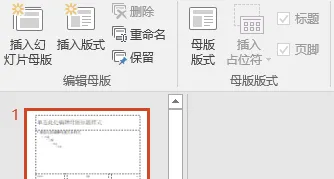
2、更换完毕的PPT只有三个版式,对应模板PPT的版式。3、画面更新后,原比例不变。如原来的比例是4:3,模板是16:9,则更新后的还是4:3。6、需要将需更新的PPT保留一个母版,且“编辑母版”中的“保留”为不选择状态,如下图所示。TemplatePptPath = GetTemplatePath()Function GetTemplatePath() As String ' 文件对话框选择模板 With Application.FileDialog(msoFileDialogFilePicker) .Title = "选择新模板文件" .Filters.Add "PPT文件", "*.pptx;*.pptm;*.ppt" If .Show = -1 Then GetTemplatePath = .SelectedItems(1) End If End WithEnd Function
2、打开模板PPT获取模板PPT的母版。
Set TemplateP = Presentations.Open(TemplatePptPath, withwindow:=msoFalse)Set TemplatePpt = TemplateP.SlideMaster.CustomLayouts '选择模板PPT
3、更改模板PPT的页名称,避免名称与更新的PPT名称重复。
TemplateOffice1 = InputBox("请输入更改模板PPT的首页名:")TemplatePpt.Item(1).Name = TemplateOffice1TemplateOffice2 = InputBox("请输入更改模板PPT的中间页名:")TemplatePpt.Item(2).Name = TemplateOffice2TemplateOffice3 = InputBox("请输入更改模板PPT的尾页名:")TemplatePpt.Item(3).Name = TemplateOffice3
4、、调用文件对话框,选择文件夹即可。
Set fDialog = Application.FileDialog(msoFileDialogFolderPicker)fDialog.Title = "请选择文件夹"If fDialog.Show = -1 ThenfPath = fDialog.SelectedItems(1)' 确保路径以反斜杠结尾If Right(fPath, 1) <> "\" Then fPath = fPath & "\"' 清空工作表并添加标题fName = Dir(fPath & "*.*") ' 获取第一个文件' 循环获取所有文件Do While fName <> ""、、、fName = Dir() ' 获取下一个文件Loop
5、隐藏式打开所选文件夹的第一个文件,将模板PPT的母版复制到更新的PPT中。
Set CurrentPpt = Presentations.Open(fPath & fName, withwindow:=msoFalse)'### 复制母版到当前PPTCurrentPpt.ApplyTemplate TemplatePptPath
6、将需更新的PPT第一页和最后一页替换为母版的首页和末页,逻辑是遍历母版,按照上面更改的名称确认更改模板。
CurrentPpt.Slides.Item(1).CustomLayout = GetTemplate(CurrentPpt.SlideMaster.CustomLayouts, TemplateOffice1)CurrentPpt.Slides.Item(CurrentPpt.Slides.Count).CustomLayout = GetTemplate(CurrentPpt.SlideMaster.CustomLayouts, TemplateOffice3)Function GetTemplate(Cus As CustomLayouts, str As String) As CustomLayoutFor i = 1 To Cus.CountIf Cus.Item(i).Name = str ThenSet template = Cus.Item(i)End IfNextIf Not IsEmpty(template) ThenSet GetTemplate = templateSet template = NothingElseMsgBox "未复制母版"Exit FunctionEnd IfEnd Function
7、循环遍历需更新的PPT,获取中间页的数量并批量替换。
For i = 2 To CurrentPpt.Slides.Count - 1 CurrentPpt.Slides.Item(i).CustomLayout = GetTemplate(CurrentPpt.SlideMaster.CustomLayouts, TemplateOffice2)Next
二、代码
Sub RePlacePPT()Dim TemplatePpt As CustomLayoutsDim TemplateOfficeName As StringDim TemplateOffice1 As StringDim TemplateOffice2 As StringDim TemplateOffice3 As StringDim CurrentPpt As PresentationDim str As String'### 选择模板PPT的路径并打开MsgBox "接下来请选择你的模板PPT"TemplatePptPath = GetTemplatePath()Set TemplateP = Presentations.Open(TemplatePptPath, withwindow:=msoFalse)Set TemplatePpt = TemplateP.SlideMaster.CustomLayouts '选择模板PPTMsgBox "接下来请更新母版PPT的名称"'### 选择模板PPT的母版名称TemplateOffice1 = InputBox("请输入更改模板PPT的首页名:")TemplatePpt.Item(1).Name = TemplateOffice1TemplateOffice2 = InputBox("请输入更改模板PPT的中间页名:")TemplatePpt.Item(2).Name = TemplateOffice2TemplateOffice3 = InputBox("请输入更改模板PPT的尾页名:")TemplatePpt.Item(3).Name = TemplateOffice3TemplateP.SaveTemplateP.CloseMsgBox "接下来请选择你需要更换的PPT路径"Set fDialog = Application.FileDialog(msoFileDialogFolderPicker)fDialog.Title = "请选择文件夹"If fDialog.Show = -1 ThenfPath = fDialog.SelectedItems(1)' 确保路径以反斜杠结尾If Right(fPath, 1) <> "\" Then fPath = fPath & "\"' 清空工作表并添加标题 fName = Dir(fPath & "*.*") ' 获取第一个文件 ' 循环获取所有文件 Do While fName <> "" '### 循环打开PPT Set CurrentPpt = Presentations.Open(fPath & fName, withwindow:=msoFalse) '### 复制母版到当前PPT CurrentPpt.ApplyTemplate TemplatePptPath CurrentPpt.Slides.Item(1).CustomLayout = GetTemplate(CurrentPpt.SlideMaster.CustomLayouts, TemplateOffice1) For i = 2 To CurrentPpt.Slides.Count - 1 CurrentPpt.Slides.Item(i).CustomLayout = GetTemplate(CurrentPpt.SlideMaster.CustomLayouts, TemplateOffice2) Next CurrentPpt.Slides.Item(CurrentPpt.Slides.Count).CustomLayout = GetTemplate(CurrentPpt.SlideMaster.CustomLayouts, TemplateOffice3) CurrentPpt.Save CurrentPpt.Close Set CurrentPpt = Nothing fName = Dir() ' 获取下一个文件 LoopElse MsgBox "用户取消了操作", vbInformationEnd IfSet TemplateP = NothingSet TemplatePpt = NothingSet CurrentPpt = NothingMsgBox "工作完成!"End SubFunction GetTemplatePath() As String ' 文件对话框选择模板 With Application.FileDialog(msoFileDialogFilePicker) .Title = "选择新模板文件" .Filters.Add "PPT文件", "*.pptx;*.pptm;*.ppt" If .Show = -1 Then GetTemplatePath = .SelectedItems(1) End If End WithEnd FunctionFunction GetTemplate(Cus As CustomLayouts, str As String) As CustomLayout For i = 1 To Cus.Count If Cus.Item(i).Name = str Then Set template = Cus.Item(i) End If Next If Not IsEmpty(template) Then Set GetTemplate = template Set template = Nothing Else MsgBox "未复制母版" Exit Function End IfEnd Function
注:代码没有写报错,使用时遇到错误根据提示来更改即可。